~
~
:wq

Showing posts with label ubuntu. Show all posts

Tuesday, 24 December 2013

Force reinstall of configuration files

Some times things go wrong and you want to restore default configuration files.

This quick tip is devoted to debian based distributions

One may think that the apt-get flag - -reinstall will do the trick, however that's not enough. You'll need to provide some not-so-obvious arguments:

apt-get -o Dpkg::Options::="--force-confmiss" install --reinstall package-name

With that command the missing configuration files and missing directories will be re-deployed.

If you need to, you may want to remove the messed configuration files that you want to restore before issuing the command.

Wednesday, 1 February 2012

Touchpad freezes sometimes in Ubuntu 11.10. Workaround

Randomly and fortunately not too often (maybe two or three times in the last 5 months) the mouse cursor freezes on my laptop (Ubuntu 11.10 64Bits). This usually happens when using thunderbird, however I don't have a test-case to report to launchpad yet.

This is quite annoying and what I did in the previous occasions was to hit CTRL-ALT-F1 and restart lightdm.

However It has just happened once again right now, so I did a quick search and I've found a clean workaround to bring (activate) the touchpad again. Simply launch a terminal (ctrl-alt-t) if you already don't have one at hand and execute:

synclient TouchpadOff=0

Credits to effenberg0x0 from ubuntu forums.

Synclient (from it's man page): is a program that lets you change your Synaptics TouchPad driver for XOrg/XFree86 server parameters while X is running.

Further info:

  • man synaptics
  • man synclient

Sunday, 6 November 2011

Unity's "about:config" doesn't work in Ubuntu 11.10 Oneirc Ocelot

Custumization of Unity in Ubuntu 11.10; about:config doesn't work

spanish version - all english posts

Unity probably due to a misguided Ubuntu's "zero-config" policy cannot be customized by the end user. At least by default.

Theroetically by pressing alt-F2 and typing in the laucher "about:config" the configuration/personalization utility of Unity should appear... but although the icon of the configuration utility shows up, nothing happens at all. Neither even a notice that the config utility is not working. A minimal configuration tool is not installed by default. Incredible!

To make the configuration utility work you must install CCSM (The «compiz config settings manager»):

apt-get install compizconfig-settings-manager

Once that package is installed, the "about:config" thing will work. It's pretty sad that Ubuntu doesn't allow the end user to personalize the desktop (or doesn't seriously take into account that possibility); but it is at least as sad, that when the user tries to launch the "hidden" config utility there is not a minimal warning saying that the user should install CCSM to make it work.

To check the few (really few) options that the CCSM configuration tool allows, I recommend to read the following link; but once you have opened the utility you will notice that there's not much to customize:

http://askubuntu.com/questions/29553/how-can-i-configure-unity

However it seems that things will change in the near future:

http://www.omgubuntu.co.uk/2011/11/ubuntu-desktop-designers-clarify-on-configurability/

Unity "about:config" no funciona en Ubuntu 11.10 Oneiric Ocelot

Personalización de Unity en Ubuntu 11.10; about:config no funciona

english version - all spanish posts

Unity debido probablemente a la política mal entendida de "zero-config" de Ubuntu no se puede modificar y personalizar por defecto.

Teóricamente pulsando alt-F2 y escribiendo en el lanzador "about:config" debería lanzarse la utilidad de configuración de Unity... pero aunque aparece el icono de la utilidad de configuración, al hacer click sobre este no pasa nada. Ni un aviso indicando que la utilidad de configuración no se puede ejecutar. ¡Sí, parece mentira! pero la herramienta de configuración no está instalada por defecto.

Para que funcione hay que instalar CCSM (compiz config settings manager):

apt-get install compizconfig-settings-manager

Una vez instalado funcionará "about:config". Es bastante triste que no permitan que el usuario realice modificaciones mínimas en su escritorio, pero lo es mucho más que ni siquiera cuando se ejecuta "about:config" aparezca un aviso indicando que para que funcione hay que instalar CCSM.

Para ver las pocas (realmente pocas) opciones de configuración que permite CCSM os recomiendo ver el siguiente enlace aunque una vez hayáis abierto la utilidad veréis que tampoco hay mucho que personalizar:

http://askubuntu.com/questions/29553/how-can-i-configure-unity

De cualquier modo parece que las cosas cambiarán en un futuro próximo:

http://www.omgubuntu.co.uk/2011/11/ubuntu-desktop-designers-clarify-on-configurability/

Monday, 17 October 2011

Deshabilitar la cuenta de invitado en Ubuntu 11.10 (Oneiric Ocelot)

english version - all spanish posts

¿cómo quitar el acceso de invitado en ubuntu 11.10?
Ubuntu a partir de la versión 11.10 (Oneiric Ocelot) usa como display manager por defecto lightDM. Es bastante más atractivo que el viejo GDM pero incorpora "de serie" una sesión de invitado sin ningún tipo de restricción por contraseña. Es una decisión de los desarrolladores de Ubuntu cuanto menos cuestionable (¿cúal es su utilidad? ¿no se preocupan por la seguridad? ¿se están pasando con la facilidad de uso? ...). En fin. Para deshabilitar el login del invitado podemos ecitar el fichero de configuración de lightgdm que se encuentra en /etc/lightdm/lightdm.conf. bastará con añadir la opción allow-guest=false. Tras el cambio el fichero de configuración debería parecerse a esto:
~$ cat /etc/lightdm/lightdm.conf

[SeatDefaults]
greeter-session=unity-greeter
user-session=ubuntu
allow-guest=false
Para aplicar el cambio reiniciamos el demonio lightgdm:
sudo restart lightdm
Eso es todo. Podéis acceder a una descripción detallada de muchos (sino todos) de los parámetros que admite el fichero de configuración de lightdm (lightdm.conf) en los directorios de documentación en /usr/share/doc/lightdm/lightdm.conf. Pongo una copia aquí del fichero para facilitar su consulta:
#
# General configuration
#
# start-default-seat = True to always start one seat if none are defined in the configuration
# greeter-user = User to run greeter as
# minimum-display-number = Minimum display number to use for X servers
# minimum-vt = First VT to run displays on
# user-authority-in-system-dir = True if session authority should be in the system location
# guest-account-script = Script to be run to setup guest account
# log-directory = Directory to log information to
# run-directory = Directory to put running state in
# cache-directory = Directory to cache to
# xsessions-directory = Directory to find X sessions
# xgreeters-directory = Directory to find X greeters
#
[LightDM]
#start-default-seat=true
#greeter-user=lightdm
#minimum-display-number=0
#minimum-vt=7
#user-authority-in-system-dir=false
#guest-account-script=guest-account
#log-directory=/var/log/lightdm
#run-directory=/var/run/lightdm
#cache-directory=/var/cache/lightdm
#xsessions-directory=/usr/share/xsessions
#xgreeters-directory=/usr/share/xgreeters

#
# Seat defaults
#
# xserver-command = X server command to run
# xserver-layout = Layout to pass to X server
# xserver-config = Config file to pass to X server
# xserver-allow-tcp = True if TCP/IP connections are allowed to this X server
# xdmcp-manager = XDMCP manager to connect to (implies xserver-allow-tcp=true)
# xdmcp-port = XDMCP UDP/IP port to communicate on
# xdmcp-key = Authentication key to use for XDM-AUTHENTICATION-1 (stored in keys.conf)
# greeter-session = Session to load for greeter
# greeter-hide-users = True to hide the user list
# user-session = Session to load for users
# allow-guest = True if guest login is allowed
# guest-session = Session to load for guests (overrides user-session)
# session-wrapper = Wrapper script to run session with
# display-setup-script = Script to run when starting a greeter session (runs as root)
# greeter-setup-script = Script to run when starting a greeter (runs as root)
# session-setup-script = Script to run when starting a user session (runs as root)
# session-cleanup-script = Script to run when quitting a user session (runs as root)
# autologin-guest = True to log in as guest by default
# autologin-user = User to log in with by default (overrides autologin-guest)
# autologin-user-timeout = Number of seconds to wait before loading default user
# autologin-session = Session to load for automatic login (overrides user-session)
# exit-on-failure = True if the daemon should exit if this seat fails
#
[SeatDefaults]
#xserver-command=X
#xserver-layout=
#xserver-config=
#xserver-allow-tcp=false
#xdmcp-manager=
#xdmcp-port=177
#xdmcp-key=
#greeter-session=example-gtk-gnome
#greeter-hide-users=false
#user-session=default
#allow-guest=true
#guest-session=UNIMPLEMENTED
#session-wrapper=lightdm-session
#display-setup-script=
#greeter-setup-script=
#session-setup-script=
#session-cleanup-script=
#autologin-guest=false
#autologin-user=
#autologin-user-timeout=0
#autologin-session=UNIMPLEMENTED
#exit-on-failure=false

#
# Seat configuration
#
# Each seat must start with "Seat:".
# Uses settings from [SeatDefaults], any of these can be overriden by setting them in this section.
#
#[Seat:0]

#
# XDMCP Server configuration
#
# enabled = True if XDMCP connections should be allowed
# port = UDP/IP port to listen for connections on
# key = Authentication key to use for XDM-AUTHENTICATION-1 or blank to not use authentication (stored in keys.conf)
#
# The authentication key is a 56 bit DES key specified in hex as 0xnnnnnnnnnnnnnn.  Alternatively
# it can be a word and the first 7 characters are used as the key.
#
[XDMCPServer]
#enabled=false
#port=177
#key=

#
# VNC Server configuration
#
# enabled = True if VNC connections should be allowed
# port = TCP/IP port to listen for connections on
#
[VNCServer]
#enabled=false
#port=5900

Sunday, 16 October 2011

Disable guest session in Ubuntu 11.10 (oneiric ocelot)

spanish version - all english posts

How to disable the guest account in Ubuntu 11.10?
Ubuntu 11.10 uses lightDM as the default display manager. Certainly it looks cooler than the old GDM, but by default it comes (in the ubuntu package) with a guest session enabled which is at least an arguable decision from many points of view (utility, security, etc). To disable that guest login account option edit the lightdm's config file /etc/lightdm/lightdm.conf and put on it the parameter allow-guest=false. After that the configuration file should look like:
~$ cat /etc/lightdm/lightdm.conf

[SeatDefaults]
greeter-session=unity-greeter
user-session=ubuntu
allow-guest=false
To achieve the changes restart the lightdm daemon:
sudo restart lightdm
That's it. You have a detailed description of all (many) the options that can be used in the configuration file lightdm.conf at /usr/share/doc/lightdm/lightdm.conf. Let me copy it here to make easier for you to consult them:
#
# General configuration
#
# start-default-seat = True to always start one seat if none are defined in the configuration
# greeter-user = User to run greeter as
# minimum-display-number = Minimum display number to use for X servers
# minimum-vt = First VT to run displays on
# user-authority-in-system-dir = True if session authority should be in the system location
# guest-account-script = Script to be run to setup guest account
# log-directory = Directory to log information to
# run-directory = Directory to put running state in
# cache-directory = Directory to cache to
# xsessions-directory = Directory to find X sessions
# xgreeters-directory = Directory to find X greeters
#
[LightDM]
#start-default-seat=true
#greeter-user=lightdm
#minimum-display-number=0
#minimum-vt=7
#user-authority-in-system-dir=false
#guest-account-script=guest-account
#log-directory=/var/log/lightdm
#run-directory=/var/run/lightdm
#cache-directory=/var/cache/lightdm
#xsessions-directory=/usr/share/xsessions
#xgreeters-directory=/usr/share/xgreeters

#
# Seat defaults
#
# xserver-command = X server command to run
# xserver-layout = Layout to pass to X server
# xserver-config = Config file to pass to X server
# xserver-allow-tcp = True if TCP/IP connections are allowed to this X server
# xdmcp-manager = XDMCP manager to connect to (implies xserver-allow-tcp=true)
# xdmcp-port = XDMCP UDP/IP port to communicate on
# xdmcp-key = Authentication key to use for XDM-AUTHENTICATION-1 (stored in keys.conf)
# greeter-session = Session to load for greeter
# greeter-hide-users = True to hide the user list
# user-session = Session to load for users
# allow-guest = True if guest login is allowed
# guest-session = Session to load for guests (overrides user-session)
# session-wrapper = Wrapper script to run session with
# display-setup-script = Script to run when starting a greeter session (runs as root)
# greeter-setup-script = Script to run when starting a greeter (runs as root)
# session-setup-script = Script to run when starting a user session (runs as root)
# session-cleanup-script = Script to run when quitting a user session (runs as root)
# autologin-guest = True to log in as guest by default
# autologin-user = User to log in with by default (overrides autologin-guest)
# autologin-user-timeout = Number of seconds to wait before loading default user
# autologin-session = Session to load for automatic login (overrides user-session)
# exit-on-failure = True if the daemon should exit if this seat fails
#
[SeatDefaults]
#xserver-command=X
#xserver-layout=
#xserver-config=
#xserver-allow-tcp=false
#xdmcp-manager=
#xdmcp-port=177
#xdmcp-key=
#greeter-session=example-gtk-gnome
#greeter-hide-users=false
#user-session=default
#allow-guest=true
#guest-session=UNIMPLEMENTED
#session-wrapper=lightdm-session
#display-setup-script=
#greeter-setup-script=
#session-setup-script=
#session-cleanup-script=
#autologin-guest=false
#autologin-user=
#autologin-user-timeout=0
#autologin-session=UNIMPLEMENTED
#exit-on-failure=false

#
# Seat configuration
#
# Each seat must start with "Seat:".
# Uses settings from [SeatDefaults], any of these can be overriden by setting them in this section.
#
#[Seat:0]

#
# XDMCP Server configuration
#
# enabled = True if XDMCP connections should be allowed
# port = UDP/IP port to listen for connections on
# key = Authentication key to use for XDM-AUTHENTICATION-1 or blank to not use authentication (stored in keys.conf)
#
# The authentication key is a 56 bit DES key specified in hex as 0xnnnnnnnnnnnnnn.  Alternatively
# it can be a word and the first 7 characters are used as the key.
#
[XDMCPServer]
#enabled=false
#port=177
#key=

#
# VNC Server configuration
#
# enabled = True if VNC connections should be allowed
# port = TCP/IP port to listen for connections on
#
[VNCServer]
#enabled=false
#port=5900

Saturday, 17 April 2010

Installing vmware-server-2.0.2 in Ubuntu Lucid Lynx 10.04 LTS

spanish version - all english posts

Howto make work wmware-server-2.0.2 in Ubuntu 10.04 LTS lucid lynx

I'm using lucid's beta for a month. Today I remembered that I had not yet tested vmware-server on 10.04 lucid; so we will see how to solve the problems that may appear.

Basically we will do the same we did for karmic:

  1. install vmware-server
  2. apply the ubuntugeek's patch

But since the kernel version in lucid is 2.6.32 to get the vmware modules compile we will need to...

  1. manualy edit a couple of files:

    vmnet-only/vnetUserListener.c
    vmci-only/linux/vmciKernelIf.c
    

Note: at the end of this post there is a remark about vmware-tools in Ubuntu lucid 10.04 LTS guests

Lets summarize the process step by step:

First of all we need a basic build environment to compile the vmware modules; with the following commands we will install all the programs we'll need and its dependencies:

~# aptitude update
~# aptitude -y install build-essential linux-headers-$(uname -r) psmisc

Untar the vmware-server tarball that you have already download from vmware's site:

~# tar xvf VMware-server-2.0.2-203138.i386.tar.gz

We proceed to perform the installation:

~# cd /tmp/vmware-server-distrib/
~# ./vmware-install.pl

When the process arrives to the modules compilation step, we see the same error that happens in all the last ubuntu releases:

None of the pre-built vmmon modules for VMware Server is suitable for your
running kernel.  Do you want this program to try to build the vmmon module for
your system (you need to have a C compiler installed on your system)? [yes]

Using compiler "/usr/bin/gcc". Use environment variable CC to override.

What is the location of the directory of C header files that match your running
kernel? [/lib/modules/2.6.32-21-generic/build/include]

Extracting the sources of the vmmon module.

Building the vmmon module.

Using 2.6.x kernel build system.
make: Entering directory `/tmp/vmware-config1/vmmon-only'
make -C /lib/modules/2.6.32-21-generic/build/include/.. SUBDIRS=$PWD SRCROOT=$PWD/. modules
make[1]: Entering directory `/usr/src/linux-headers-2.6.32-21-generic'
  CC [M]  /tmp/vmware-config1/vmmon-only/linux/driver.o
In file included from /tmp/vmware-config1/vmmon-only/linux/driver.c:31:
/tmp/vmware-config1/vmmon-only/./include/compat_wait.h:78: error: conflicting types for 'poll_initwait'
include/linux/poll.h:70: note: previous declaration of 'poll_initwait' was here
In file included from /tmp/vmware-config1/vmmon-only/./include/vmware.h:38,
                 from /tmp/vmware-config1/vmmon-only/linux/driver.c:99:
/tmp/vmware-config1/vmmon-only/./include/vm_basic_types.h:108:7: warning: "__FreeBSD__" is not defined
In file included from /tmp/vmware-config1/vmmon-only/./common/vmx86.h:32,
                 from /tmp/vmware-config1/vmmon-only/linux/driver.h:29,
                 from /tmp/vmware-config1/vmmon-only/linux/driver.c:101:
/tmp/vmware-config1/vmmon-only/./include/x86msr.h:164:1: warning: "MSR_THERM2_CTL" redefined
In file included from /usr/src/linux-headers-2.6.32-21-generic/arch/x86/include/asm/msr.h:4,
                 from /usr/src/linux-headers-2.6.32-21-generic/arch/x86/include/asm/processor.h:21,
                 from include/linux/prefetch.h:14,
                 from include/linux/list.h:6,
                 from include/linux/module.h:9,
                 from /tmp/vmware-config1/vmmon-only/./include/compat_module.h:27,
                 from /tmp/vmware-config1/vmmon-only/linux/driver.c:26:
/usr/src/linux-headers-2.6.32-21-generic/arch/x86/include/asm/msr-index.h:227:1: warning: this is the location of the previous definition
In file included from /tmp/vmware-config1/vmmon-only/./include/vcpuset.h:103,
                 from /tmp/vmware-config1/vmmon-only/./include/modulecall.h:37,
                 from /tmp/vmware-config1/vmmon-only/./common/vmx86.h:33,
                 from /tmp/vmware-config1/vmmon-only/linux/driver.h:29,
                 from /tmp/vmware-config1/vmmon-only/linux/driver.c:101:
/tmp/vmware-config1/vmmon-only/./include/vm_atomic.h:329:7: warning: "_MSC_VER" is not defined
/tmp/vmware-config1/vmmon-only/./include/vm_atomic.h:333:7: warning: "_MSC_VER" is not defined
/tmp/vmware-config1/vmmon-only/./include/vm_atomic.h:401:7: warning: "_MSC_VER" is not defined
/tmp/vmware-config1/vmmon-only/./include/vm_atomic.h:407:7: warning: "_MSC_VER" is not defined
/tmp/vmware-config1/vmmon-only/./include/vm_atomic.h:506:7: warning: "_MSC_VER" is not defined
/tmp/vmware-config1/vmmon-only/./include/vm_atomic.h:595:7: warning: "_MSC_VER" is not defined
/tmp/vmware-config1/vmmon-only/./include/vm_atomic.h:684:7: warning: "_MSC_VER" is not defined
/tmp/vmware-config1/vmmon-only/./include/vm_atomic.h:773:7: warning: "_MSC_VER" is not defined
/tmp/vmware-config1/vmmon-only/./include/vm_atomic.h:775:7: warning: "_MSC_VER" is not defined
/tmp/vmware-config1/vmmon-only/./include/vm_atomic.h:860:7: warning: "_MSC_VER" is not defined
/tmp/vmware-config1/vmmon-only/./include/vm_atomic.h:862:7: warning: "_MSC_VER" is not defined
/tmp/vmware-config1/vmmon-only/./include/vm_atomic.h:945:7: warning: "_MSC_VER" is not defined
/tmp/vmware-config1/vmmon-only/./include/vm_atomic.h:947:7: warning: "_MSC_VER" is not defined
/tmp/vmware-config1/vmmon-only/./include/vm_atomic.h:1028:7: warning: "_MSC_VER" is not defined
/tmp/vmware-config1/vmmon-only/./include/vm_atomic.h:1030:7: warning: "_MSC_VER" is not defined
/tmp/vmware-config1/vmmon-only/./include/vm_atomic.h:1223:7: warning: "_MSC_VER" is not defined
/tmp/vmware-config1/vmmon-only/./include/vm_atomic.h:1227:7: warning: "_MSC_VER" is not defined
/tmp/vmware-config1/vmmon-only/./include/vm_atomic.h:1536:7: warning: "_MSC_VER" is not defined
/tmp/vmware-config1/vmmon-only/./include/vm_atomic.h:1663:7: warning: "_MSC_VER" is not defined
In file included from /tmp/vmware-config1/vmmon-only/./include/vm_basic_asm.h:46,
                 from /tmp/vmware-config1/vmmon-only/./include/rateconv.h:45,
                 from /tmp/vmware-config1/vmmon-only/./include/modulecall.h:40,
                 from /tmp/vmware-config1/vmmon-only/./common/vmx86.h:33,
                 from /tmp/vmware-config1/vmmon-only/linux/driver.h:29,
                 from /tmp/vmware-config1/vmmon-only/linux/driver.c:101:
/tmp/vmware-config1/vmmon-only/./include/vm_basic_asm_x86.h:62:7: warning: "_MSC_VER" is not defined
/tmp/vmware-config1/vmmon-only/./include/vm_basic_asm_x86.h:177:7: warning: "_MSC_VER" is not defined
/tmp/vmware-config1/vmmon-only/./include/vm_basic_asm_x86.h:346:7: warning: "_MSC_VER" is not defined
/tmp/vmware-config1/vmmon-only/./include/vm_basic_asm_x86.h:453:7: warning: "_MSC_VER" is not defined
In file included from /tmp/vmware-config1/vmmon-only/./include/vm_asm.h:43,
                 from /tmp/vmware-config1/vmmon-only/linux/driver.c:103:
/tmp/vmware-config1/vmmon-only/./include/vm_asm_x86.h:486:7: warning: "_MSC_VER" is not defined
/tmp/vmware-config1/vmmon-only/./include/vm_asm_x86.h:779:7: warning: "_MSC_VER" is not defined
/tmp/vmware-config1/vmmon-only/./include/vm_asm_x86.h:820:7: warning: "_MSC_VER" is not defined
/tmp/vmware-config1/vmmon-only/./include/vm_asm_x86.h:922:7: warning: "_MSC_VER" is not defined
In file included from /tmp/vmware-config1/vmmon-only/linux/driver.c:119:
/tmp/vmware-config1/vmmon-only/./common/hostif.h:53:7: warning: "WINNT_DDK" is not defined
/tmp/vmware-config1/vmmon-only/linux/driver.c: In function 'LinuxDriverSyncCallOnEachCPU':
/tmp/vmware-config1/vmmon-only/linux/driver.c:1423: error: too many arguments to function 'smp_call_function'
/tmp/vmware-config1/vmmon-only/linux/driver.c: In function 'LinuxDriver_Ioctl':
/tmp/vmware-config1/vmmon-only/linux/driver.c:1987: error: 'struct task_struct' has no member named 'euid'
/tmp/vmware-config1/vmmon-only/linux/driver.c:1987: error: 'struct task_struct' has no member named 'uid'
/tmp/vmware-config1/vmmon-only/linux/driver.c:1988: error: 'struct task_struct' has no member named 'fsuid'
/tmp/vmware-config1/vmmon-only/linux/driver.c:1988: error: 'struct task_struct' has no member named 'uid'
/tmp/vmware-config1/vmmon-only/linux/driver.c:1989: error: 'struct task_struct' has no member named 'egid'
/tmp/vmware-config1/vmmon-only/linux/driver.c:1989: error: 'struct task_struct' has no member named 'gid'
/tmp/vmware-config1/vmmon-only/linux/driver.c:1990: error: 'struct task_struct' has no member named 'fsgid'
/tmp/vmware-config1/vmmon-only/linux/driver.c:1990: error: 'struct task_struct' has no member named 'gid'
/tmp/vmware-config1/vmmon-only/linux/driver.c:2007: error: too many arguments to function 'smp_call_function'
make[2]: *** [/tmp/vmware-config1/vmmon-only/linux/driver.o] Error 1
make[1]: *** [_module_/tmp/vmware-config1/vmmon-only] Error 2
make[1]: Leaving directory `/usr/src/linux-headers-2.6.32-21-generic'
make: *** [vmmon.ko] Error 2
make: Leaving directory `/tmp/vmware-config1/vmmon-only'
Unable to build the vmmon module.

For more information on how to troubleshoot module-related problems, please
visit our Web site at "http://www.vmware.com/go/unsup-linux-products" and
"http://www.vmware.com/go/unsup-linux-tools".

Execution aborted.

Hmm, this sounds familiar; so hands-on. Download and install the ubuntugeek's patches:

~# wget -O - http://www.ubuntugeek.com/images/vmware-server.2.0.1_x64-modules-2.6.30.4-fix.tgz | tar xvfz -
~# ./vmware-server.2.0.1_x64-modules-2.6.30.4-fix.sh

But surprise, it ends up with errors:

[...]
/usr/lib/vmware/modules/source/vmnet-only/vm_basic_asm_x86.h:62:7: warning: "_MSC_VER" is not defined
/usr/lib/vmware/modules/source/vmnet-only/vm_basic_asm_x86.h:177:7: warning: "_MSC_VER" is not defined
/usr/lib/vmware/modules/source/vmnet-only/vm_basic_asm_x86.h:346:7: warning: "_MSC_VER" is not defined
/usr/lib/vmware/modules/source/vmnet-only/vm_basic_asm_x86.h:453:7: warning: "_MSC_VER" is not defined
/usr/lib/vmware/modules/source/vmnet-only/vnetUserListener.c: In function ‘VNetUserListenerEventHandler’:
/usr/lib/vmware/modules/source/vmnet-only/vnetUserListener.c:240: error: ‘TASK_INTERRUPTIBLE’ undeclared (first use in this function)
/usr/lib/vmware/modules/source/vmnet-only/vnetUserListener.c:240: error: (Each undeclared identifier is reported only once
/usr/lib/vmware/modules/source/vmnet-only/vnetUserListener.c:240: error: for each function it appears in.)
/usr/lib/vmware/modules/source/vmnet-only/vnetUserListener.c: In function ‘VNetUserListenerRead’:
/usr/lib/vmware/modules/source/vmnet-only/vnetUserListener.c:282: error: ‘TASK_INTERRUPTIBLE’ undeclared (first use in this function)
/usr/lib/vmware/modules/source/vmnet-only/vnetUserListener.c:282: error: implicit declaration of function ‘signal_pending’
/usr/lib/vmware/modules/source/vmnet-only/vnetUserListener.c:282: error: implicit declaration of function ‘schedule’
make[2]: *** [/usr/lib/vmware/modules/source/vmnet-only/vnetUserListener.o] Error 1
make[1]: *** [_module_/usr/lib/vmware/modules/source/vmnet-only] Error 2
make[1]: se sale del directorio `/usr/src/linux-headers-2.6.32-21-generic'
make: *** [vmnet.ko] Error 2
Sorry, problem compiling the vmnet module after it was patched
You must restore from this backup directory:
/usr/lib/vmware/modules/source-backup

Do not give up! Let's look for more information...

According to Noel at vmware communities we need to patch the following files:

vmnet-only/vnetUserListener.c
vmci-only/linux/vmciKernelIf.c

adding a «#include "compat_sched.h"» in each of them.

First of all lets restore the sources that we wrapped in our first attempt:

~# cd /usr/lib/vmware/modules
~# rm -r source
~# mv source-backup source

now modify the files the following way (I could have redo the ubuntugeek's patch adding these little modifications, but it's more work); so lets KISS.

First vnetUserListener.c:

~# cd source/
~# tar xvf vmnet.tar
~# vim vmnet-only/vnetUserListener.c

Among the #includes in that file add «#include "compat_sched.h"»; once done, re-pack the tar:

~# tar cvf vmnet.tar vmnet-only
~# rm -r vmnet-only

Now do the same with vmciKernelIf.c:

~# tar xvf vmci.tar
~# vim vmci-only/linux/vmciKernelIf.c

We again will add an «#include "compat_sched.h"» among the other includes. Finally re-pack the tar file:

~# tar cvf vmci.tar vmci-only/
~# rm -r vmci-only

After those little changes, run again the ubuntugeek's patch:

~# cd /tmp/
~# ./vmware-server.2.0.1_x64-modules-2.6.30.4-fix.sh
[...]
/usr/lib/vmware/modules/source/vmnet-only/vm_atomic.h:945:7: warning: "_MSC_VER" is not defined
/usr/lib/vmware/modules/source/vmnet-only/vm_atomic.h:947:7: warning: "_MSC_VER" is not defined
/usr/lib/vmware/modules/source/vmnet-only/vm_atomic.h:1028:7: warning: "_MSC_VER" is not defined
/usr/lib/vmware/modules/source/vmnet-only/vm_atomic.h:1030:7: warning: "_MSC_VER" is not defined
/usr/lib/vmware/modules/source/vmnet-only/vm_atomic.h:1223:7: warning: "_MSC_VER" is not defined
/usr/lib/vmware/modules/source/vmnet-only/vm_atomic.h:1227:7: warning: "_MSC_VER" is not defined
/usr/lib/vmware/modules/source/vmnet-only/vm_atomic.h:1536:7: warning: "_MSC_VER" is not defined
/usr/lib/vmware/modules/source/vmnet-only/vm_atomic.h:1663:7: warning: "_MSC_VER" is not defined
In file included from /usr/lib/vmware/modules/source/vmnet-only/vm_basic_asm.h:46,
                 from /usr/lib/vmware/modules/source/vmnet-only/vm_oui.h:28,
                 from /usr/lib/vmware/modules/source/vmnet-only/vnetInt.h:25,
                 from /usr/lib/vmware/modules/source/vmnet-only/vnetUserListener.c:36:
/usr/lib/vmware/modules/source/vmnet-only/vm_basic_asm_x86.h:62:7: warning: "_MSC_VER" is not defined
/usr/lib/vmware/modules/source/vmnet-only/vm_basic_asm_x86.h:177:7: warning: "_MSC_VER" is not defined
/usr/lib/vmware/modules/source/vmnet-only/vm_basic_asm_x86.h:346:7: warning: "_MSC_VER" is not defined
/usr/lib/vmware/modules/source/vmnet-only/vm_basic_asm_x86.h:453:7: warning: "_MSC_VER" is not defined
  LD [M]  /usr/lib/vmware/modules/source/vmnet-only/vmnet.o
  Building modules, stage 2.
  MODPOST 1 modules
  CC      /usr/lib/vmware/modules/source/vmnet-only/vmnet.mod.o
  LD [M]  /usr/lib/vmware/modules/source/vmnet-only/vmnet.ko
make[1]: se sale del directorio `/usr/src/linux-headers-2.6.32-21-generic'
cp -f vmnet.ko ./../vmnet.o
Replacing original file vsock.tar with patched file
Replacing original file vmci.tar with patched file
Replacing original file vmmon.tar with patched file
Replacing original file vmnet.tar with patched file
Done!

I have changed the files in here:
/usr/lib/vmware/modules/source

I have placed a backup of the original files in here:
/usr/lib/vmware/modules/source-backup

The original VMware modules directory is still in the way.
Please move this directory somewhere else, because it confuses VMware:
/usr/lib/vmware/modules/binary

This command should work now, to install the modules:
vmware-config.pl -d

We are almost done!

Install the modules (notice the '-d' flag; don't use it if you need to define non default settings or accept the license):

~# /usr/bin/vmware-config.pl -d
[...]

The installation of VMware VIX API 1.6.2 build-203138 for Linux completed
successfully. You can decide to remove this software from your system at any
time by invoking the following command: "/usr/bin/vmware-uninstall-vix.pl".

Enjoy,

--the VMware team

Starting VMware services:
   Virtual machine monitor                                             done
   Virtual machine communication interface                             done
   Virtual ethernet                                                    done
   Bridged networking on /dev/vmnet0                                   done
   Host-only networking on /dev/vmnet1 (background)                    done
   DHCP server on /dev/vmnet1                                          done
   Host-only networking on /dev/vmnet8 (background)                    done
   DHCP server on /dev/vmnet8                                          done
   NAT service on /dev/vmnet8                                          done
   VMware Server Authentication Daemon (background)                    done
   Shared Memory Available                                             done
Starting VMware management services:
   VMware Server Host Agent (background)                               done
   VMware Virtual Infrastructure Web Access
Starting VMware autostart virtual machines:
   Virtual machines                                                    done

The configuration of VMware Server 2.0.2 build-203138 for Linux for this
running kernel completed successfully.

Finally we have our new vmware 2.0.2 server working in our brand new Ubuntu Lucid Lynx 10.04

vmware-tools for ubuntu 10.04 guests

And what about vmware-tools in ubuntu 10.04 guests?

This issue may deserve it's own post, but as many of you will face this problem sooner or later; I've added this note about it at the end of this post.

I've tried to install the native vmware-tools in ubuntu 10.04 guests with no succeed.

Do not waste your time on it. There is a big lag between vmware and the new kernels

Instead of the vmware native tools install the opensource version in your guests as follows:

~# apt-get update
~# apt-get install --no-install-recommends open-vm-tools open-vm-dkms

The --no-install-recommends is to avoid the installation of X11 related packages as most of my gests have no gui.

So if your guest is a desktop leave off that flag and run:

~# apt-get update
~# apt-get install open-vm-tools open-vm-dkms

You'll see that with the opensource tools, you'll get most, if not all, the functionality you should have had with the native vmware-tools.

Hacer que funcione vmware-server-2.0.2 en ubuntu 10.04 LTS lucid lynx

english version - all spanish posts

Pasos para la instalación de wmware-server-2.0.2 en Ubuntu 10.04 LTS lucid lynx

Hace ya un mes que uso la beta de lucid. Hoy he recordado que todavía no había probado vmware-server en este servidor así que vamos a ver que problemas encontramos.

Básicamente vamos a hacer lo mismo que para karmic:

  1. instalar vmware-server
  2. aplicar el parche de ubuntugeek

Pero además para conseguir que todo compile en un kernel 2.6.32 necesitaremos...

  1. modificar manualmente un par de ficheros más:

    vmnet-only/vnetUserListener.c
    vmci-only/linux/vmciKernelIf.c
    

Nota: al final de este post he añadido un comentario sobre las vmware-tools en máquinas virtuales Ubuntu Lucid 10.04 LTS

Os resumo el proceso paso a paso:

Necesitaremos un entorno de compilación básico para poder compilar los módulos de vmware; con el siguiente comando instalaremos todo los programas que vamos a necesitar así como sus dependencias:

~# aptitude update
~# aptitude -y install build-essential linux-headers-$(uname -r) psmisc

Descomprimimos el paquete de vmware-server para la instalación:

~# tar xvf VMware-server-2.0.2-203138.i386.tar.gz

Procedemos a realizar la instalación:

~# cd /tmp/vmware-server-distrib/
~# ./vmware-install.pl

Al llegar a la compilación de los módulos de vmware vemos que se produce el error de las últimas distribuciones:

None of the pre-built vmmon modules for VMware Server is suitable for your
running kernel.  Do you want this program to try to build the vmmon module for
your system (you need to have a C compiler installed on your system)? [yes]

Using compiler "/usr/bin/gcc". Use environment variable CC to override.

What is the location of the directory of C header files that match your running
kernel? [/lib/modules/2.6.32-21-generic/build/include]

Extracting the sources of the vmmon module.

Building the vmmon module.

Using 2.6.x kernel build system.
make: se ingresa al directorio `/tmp/vmware-config0/vmmon-only'
make -C /lib/modules/2.6.32-21-generic/build/include/.. SUBDIRS=$PWD SRCROOT=$PWD/. modules
make[1]: se ingresa al directorio `/usr/src/linux-headers-2.6.32-21-generic'
  CC [M]  /tmp/vmware-config0/vmmon-only/linux/driver.o
In file included from /tmp/vmware-config0/vmmon-only/linux/driver.c:31:
/tmp/vmware-config0/vmmon-only/./include/compat_wait.h:78: error: conflicting types for ‘poll_initwait’
include/linux/poll.h:70: note: previous declaration of ‘poll_initwait’ was here
In file included from /tmp/vmware-config0/vmmon-only/./include/vmware.h:38,
                 from /tmp/vmware-config0/vmmon-only/linux/driver.c:99:
/tmp/vmware-config0/vmmon-only/./include/vm_basic_types.h:108:7: warning: "__FreeBSD__" is not defined
In file included from /tmp/vmware-config0/vmmon-only/./common/vmx86.h:32,
                 from /tmp/vmware-config0/vmmon-only/linux/driver.h:29,
                 from /tmp/vmware-config0/vmmon-only/linux/driver.c:101:
/tmp/vmware-config0/vmmon-only/./include/x86msr.h:164:1: warning: "MSR_THERM2_CTL" redefined
In file included from /usr/src/linux-headers-2.6.32-21-generic/arch/x86/include/asm/msr.h:4,
                 from /usr/src/linux-headers-2.6.32-21-generic/arch/x86/include/asm/processor.h:21,
                 from include/linux/prefetch.h:14,
                 from include/linux/list.h:6,
                 from include/linux/module.h:9,
                 from /tmp/vmware-config0/vmmon-only/./include/compat_module.h:27,
                 from /tmp/vmware-config0/vmmon-only/linux/driver.c:26:
/usr/src/linux-headers-2.6.32-21-generic/arch/x86/include/asm/msr-index.h:227:1: warning: this is the location of the previous definition
In file included from /tmp/vmware-config0/vmmon-only/./include/vcpuset.h:103,
                 from /tmp/vmware-config0/vmmon-only/./include/modulecall.h:37,
                 from /tmp/vmware-config0/vmmon-only/./common/vmx86.h:33,
                 from /tmp/vmware-config0/vmmon-only/linux/driver.h:29,
                 from /tmp/vmware-config0/vmmon-only/linux/driver.c:101:
/tmp/vmware-config0/vmmon-only/./include/vm_atomic.h:329:7: warning: "_MSC_VER" is not defined
/tmp/vmware-config0/vmmon-only/./include/vm_atomic.h:333:7: warning: "_MSC_VER" is not defined
/tmp/vmware-config0/vmmon-only/./include/vm_atomic.h:401:7: warning: "_MSC_VER" is not defined
/tmp/vmware-config0/vmmon-only/./include/vm_atomic.h:407:7: warning: "_MSC_VER" is not defined
/tmp/vmware-config0/vmmon-only/./include/vm_atomic.h:506:7: warning: "_MSC_VER" is not defined
/tmp/vmware-config0/vmmon-only/./include/vm_atomic.h:595:7: warning: "_MSC_VER" is not defined
/tmp/vmware-config0/vmmon-only/./include/vm_atomic.h:684:7: warning: "_MSC_VER" is not defined
/tmp/vmware-config0/vmmon-only/./include/vm_atomic.h:773:7: warning: "_MSC_VER" is not defined
/tmp/vmware-config0/vmmon-only/./include/vm_atomic.h:775:7: warning: "_MSC_VER" is not defined
/tmp/vmware-config0/vmmon-only/./include/vm_atomic.h:860:7: warning: "_MSC_VER" is not defined
/tmp/vmware-config0/vmmon-only/./include/vm_atomic.h:862:7: warning: "_MSC_VER" is not defined
/tmp/vmware-config0/vmmon-only/./include/vm_atomic.h:945:7: warning: "_MSC_VER" is not defined
/tmp/vmware-config0/vmmon-only/./include/vm_atomic.h:947:7: warning: "_MSC_VER" is not defined
/tmp/vmware-config0/vmmon-only/./include/vm_atomic.h:1028:7: warning: "_MSC_VER" is not defined
/tmp/vmware-config0/vmmon-only/./include/vm_atomic.h:1030:7: warning: "_MSC_VER" is not defined
/tmp/vmware-config0/vmmon-only/./include/vm_atomic.h:1223:7: warning: "_MSC_VER" is not defined
/tmp/vmware-config0/vmmon-only/./include/vm_atomic.h:1227:7: warning: "_MSC_VER" is not defined
/tmp/vmware-config0/vmmon-only/./include/vm_atomic.h:1536:7: warning: "_MSC_VER" is not defined
/tmp/vmware-config0/vmmon-only/./include/vm_atomic.h:1663:7: warning: "_MSC_VER" is not defined
In file included from /tmp/vmware-config0/vmmon-only/./include/vm_basic_asm.h:46,
                 from /tmp/vmware-config0/vmmon-only/./include/rateconv.h:45,
                 from /tmp/vmware-config0/vmmon-only/./include/modulecall.h:40,
                 from /tmp/vmware-config0/vmmon-only/./common/vmx86.h:33,
                 from /tmp/vmware-config0/vmmon-only/linux/driver.h:29,
                 from /tmp/vmware-config0/vmmon-only/linux/driver.c:101:
/tmp/vmware-config0/vmmon-only/./include/vm_basic_asm_x86.h:62:7: warning: "_MSC_VER" is not defined
/tmp/vmware-config0/vmmon-only/./include/vm_basic_asm_x86.h:177:7: warning: "_MSC_VER" is not defined
/tmp/vmware-config0/vmmon-only/./include/vm_basic_asm_x86.h:346:7: warning: "_MSC_VER" is not defined
/tmp/vmware-config0/vmmon-only/./include/vm_basic_asm_x86.h:453:7: warning: "_MSC_VER" is not defined
In file included from /tmp/vmware-config0/vmmon-only/./include/vm_asm.h:43,
                 from /tmp/vmware-config0/vmmon-only/linux/driver.c:103:
/tmp/vmware-config0/vmmon-only/./include/vm_asm_x86.h:486:7: warning: "_MSC_VER" is not defined
/tmp/vmware-config0/vmmon-only/./include/vm_asm_x86.h:779:7: warning: "_MSC_VER" is not defined
/tmp/vmware-config0/vmmon-only/./include/vm_asm_x86.h:820:7: warning: "_MSC_VER" is not defined
/tmp/vmware-config0/vmmon-only/./include/vm_asm_x86.h:922:7: warning: "_MSC_VER" is not defined
In file included from /tmp/vmware-config0/vmmon-only/linux/driver.c:119:
/tmp/vmware-config0/vmmon-only/./common/hostif.h:53:7: warning: "WINNT_DDK" is not defined
/tmp/vmware-config0/vmmon-only/linux/driver.c: In function ‘LinuxDriverSyncCallOnEachCPU’:
/tmp/vmware-config0/vmmon-only/linux/driver.c:1423: error: too many arguments to function ‘smp_call_function’
/tmp/vmware-config0/vmmon-only/linux/driver.c: In function ‘LinuxDriver_Ioctl’:
/tmp/vmware-config0/vmmon-only/linux/driver.c:1987: error: ‘struct task_struct’ has no member named ‘euid’
/tmp/vmware-config0/vmmon-only/linux/driver.c:1987: error: ‘struct task_struct’ has no member named ‘uid’
/tmp/vmware-config0/vmmon-only/linux/driver.c:1988: error: ‘struct task_struct’ has no member named ‘fsuid’
/tmp/vmware-config0/vmmon-only/linux/driver.c:1988: error: ‘struct task_struct’ has no member named ‘uid’
/tmp/vmware-config0/vmmon-only/linux/driver.c:1989: error: ‘struct task_struct’ has no member named ‘egid’
/tmp/vmware-config0/vmmon-only/linux/driver.c:1989: error: ‘struct task_struct’ has no member named ‘gid’
/tmp/vmware-config0/vmmon-only/linux/driver.c:1990: error: ‘struct task_struct’ has no member named ‘fsgid’
/tmp/vmware-config0/vmmon-only/linux/driver.c:1990: error: ‘struct task_struct’ has no member named ‘gid’
/tmp/vmware-config0/vmmon-only/linux/driver.c:2007: error: too many arguments to function ‘smp_call_function’
make[2]: *** [/tmp/vmware-config0/vmmon-only/linux/driver.o] Error 1
make[1]: *** [_module_/tmp/vmware-config0/vmmon-only] Error 2
make[1]: se sale del directorio `/usr/src/linux-headers-2.6.32-21-generic'
make: *** [vmmon.ko] Error 2
make: se sale del directorio `/tmp/vmware-config0/vmmon-only'
Unable to build the vmmon module.

For more information on how to troubleshoot module-related problems, please
visit our Web site at "http://www.vmware.com/go/unsup-linux-products" and
"http://www.vmware.com/go/unsup-linux-tools".

Execution aborted.

Hmm, esto nos suena bastante así que manos a la obra, descargamos e instalamos los parches de ubuntugeek:

~# cd /tmp/
~# wget -O - http://www.ubuntugeek.com/images/vmware-server.2.0.1_x64-modules-2.6.30.4-fix.tgz | tar xvfz -
~# ./vmware-server.2.0.1_x64-modules-2.6.30.4-fix.sh

Pero sorpresa, acaba con errores:

[...]
/usr/lib/vmware/modules/source/vmnet-only/vm_basic_asm_x86.h:62:7: warning: "_MSC_VER" is not defined
/usr/lib/vmware/modules/source/vmnet-only/vm_basic_asm_x86.h:177:7: warning: "_MSC_VER" is not defined
/usr/lib/vmware/modules/source/vmnet-only/vm_basic_asm_x86.h:346:7: warning: "_MSC_VER" is not defined
/usr/lib/vmware/modules/source/vmnet-only/vm_basic_asm_x86.h:453:7: warning: "_MSC_VER" is not defined
/usr/lib/vmware/modules/source/vmnet-only/vnetUserListener.c: In function ‘VNetUserListenerEventHandler’:
/usr/lib/vmware/modules/source/vmnet-only/vnetUserListener.c:240: error: ‘TASK_INTERRUPTIBLE’ undeclared (first use in this function)
/usr/lib/vmware/modules/source/vmnet-only/vnetUserListener.c:240: error: (Each undeclared identifier is reported only once
/usr/lib/vmware/modules/source/vmnet-only/vnetUserListener.c:240: error: for each function it appears in.)
/usr/lib/vmware/modules/source/vmnet-only/vnetUserListener.c: In function ‘VNetUserListenerRead’:
/usr/lib/vmware/modules/source/vmnet-only/vnetUserListener.c:282: error: ‘TASK_INTERRUPTIBLE’ undeclared (first use in this function)
/usr/lib/vmware/modules/source/vmnet-only/vnetUserListener.c:282: error: implicit declaration of function ‘signal_pending’
/usr/lib/vmware/modules/source/vmnet-only/vnetUserListener.c:282: error: implicit declaration of function ‘schedule’
make[2]: *** [/usr/lib/vmware/modules/source/vmnet-only/vnetUserListener.o] Error 1
make[1]: *** [_module_/usr/lib/vmware/modules/source/vmnet-only] Error 2
make[1]: se sale del directorio `/usr/src/linux-headers-2.6.32-21-generic'
make: *** [vmnet.ko] Error 2
Sorry, problem compiling the vmnet module after it was patched
You must restore from this backup directory:
/usr/lib/vmware/modules/source-backup

No nos desanimemos. Busquemos más información... Según Noel de vmware communities hay que parchear los ficheros:

vmnet-only/vnetUserListener.c
vmci-only/linux/vmciKernelIf.c

añadiendo un «#include "compat_sched.h"» en cada uno de ellos.

Como ya hemos enredado mucho restauramos los fuentes según nos indicaba la salida del primer intento:

~# cd /usr/lib/vmware/modules
~# rm -r source
~# mv source-backup source

ahora modificamos los ficheros de la siguiente forma (podríamos rehacer el parche pero es mas trabajo); empezamos con vnetUserListener.c:

~# cd source/
~# tar xvf vmnet.tar
~# vim vmnet-only/vnetUserListener.c

Entre el listado de includes añadimos «#include "compat_sched.h"» y volvemos a empaquetar el tar:

~# tar cvf vmnet.tar vmnet-only
~# rm -r vmnet-only

Ahora hacemos lo mismo con vmciKernelIf.c:

~# tar xvf vmci.tar
~# vim vmci-only/linux/vmciKernelIf.c

Volvemos a añadir un «#include "compat_sched.h"» entre el resto de includes y reempaquetamos el fichero tar:

~# tar cvf vmci.tar vmci-only/
~# rm -r vmci-only

Con esos cambios volvemos a ejecutar el parche descargado de ubuntugeek:

~# cd /tmp/
~# ./vmware-server.2.0.1_x64-modules-2.6.30.4-fix.sh
[...]
/usr/lib/vmware/modules/source/vmnet-only/vm_atomic.h:945:7: warning: "_MSC_VER" is not defined
/usr/lib/vmware/modules/source/vmnet-only/vm_atomic.h:947:7: warning: "_MSC_VER" is not defined
/usr/lib/vmware/modules/source/vmnet-only/vm_atomic.h:1028:7: warning: "_MSC_VER" is not defined
/usr/lib/vmware/modules/source/vmnet-only/vm_atomic.h:1030:7: warning: "_MSC_VER" is not defined
/usr/lib/vmware/modules/source/vmnet-only/vm_atomic.h:1223:7: warning: "_MSC_VER" is not defined
/usr/lib/vmware/modules/source/vmnet-only/vm_atomic.h:1227:7: warning: "_MSC_VER" is not defined
/usr/lib/vmware/modules/source/vmnet-only/vm_atomic.h:1536:7: warning: "_MSC_VER" is not defined
/usr/lib/vmware/modules/source/vmnet-only/vm_atomic.h:1663:7: warning: "_MSC_VER" is not defined
In file included from /usr/lib/vmware/modules/source/vmnet-only/vm_basic_asm.h:46,
                 from /usr/lib/vmware/modules/source/vmnet-only/vm_oui.h:28,
                 from /usr/lib/vmware/modules/source/vmnet-only/vnetInt.h:25,
                 from /usr/lib/vmware/modules/source/vmnet-only/vnetUserListener.c:36:
/usr/lib/vmware/modules/source/vmnet-only/vm_basic_asm_x86.h:62:7: warning: "_MSC_VER" is not defined
/usr/lib/vmware/modules/source/vmnet-only/vm_basic_asm_x86.h:177:7: warning: "_MSC_VER" is not defined
/usr/lib/vmware/modules/source/vmnet-only/vm_basic_asm_x86.h:346:7: warning: "_MSC_VER" is not defined
/usr/lib/vmware/modules/source/vmnet-only/vm_basic_asm_x86.h:453:7: warning: "_MSC_VER" is not defined
  LD [M]  /usr/lib/vmware/modules/source/vmnet-only/vmnet.o
  Building modules, stage 2.
  MODPOST 1 modules
  CC      /usr/lib/vmware/modules/source/vmnet-only/vmnet.mod.o
  LD [M]  /usr/lib/vmware/modules/source/vmnet-only/vmnet.ko
make[1]: se sale del directorio `/usr/src/linux-headers-2.6.32-21-generic'
cp -f vmnet.ko ./../vmnet.o
Replacing original file vsock.tar with patched file
Replacing original file vmci.tar with patched file
Replacing original file vmmon.tar with patched file
Replacing original file vmnet.tar with patched file
Done!

I have changed the files in here:
/usr/lib/vmware/modules/source

I have placed a backup of the original files in here:
/usr/lib/vmware/modules/source-backup

The original VMware modules directory is still in the way.
Please move this directory somewhere else, because it confuses VMware:
/usr/lib/vmware/modules/binary

This command should work now, to install the modules:
vmware-config.pl -d

Pues ya está casi; terminamos instalando los módulos:

~# /usr/bin/vmware-config.pl -d
[...]

The installation of VMware VIX API 1.6.2 build-203138 for Linux completed
successfully. You can decide to remove this software from your system at any
time by invoking the following command: "/usr/bin/vmware-uninstall-vix.pl".

Enjoy,

--the VMware team

Starting VMware services:
   Virtual machine monitor                                             done
   Virtual machine communication interface                             done
   Virtual ethernet                                                    done
   Bridged networking on /dev/vmnet0                                   done
   Host-only networking on /dev/vmnet1 (background)                    done
   DHCP server on /dev/vmnet1                                          done
   Host-only networking on /dev/vmnet8 (background)                    done
   DHCP server on /dev/vmnet8                                          done
   NAT service on /dev/vmnet8                                          done
   VMware Server Authentication Daemon (background)                    done
   Shared Memory Available                                             done
Starting VMware management services:
   VMware Server Host Agent (background)                               done
   VMware Virtual Infrastructure Web Access
Starting VMware autostart virtual machines:
   Virtual machines                                                    done

The configuration of VMware Server 2.0.2 build-203138 for Linux for this
running kernel completed successfully.

Ya disponemos de nuevo de nuestro servidor vmware-server-2.0.2 en nuestro novísimo Ubuntu 10.04 Lucid Lynx

vmware-tools para máquinas virtuales ubuntu 10.04

¿Y que pasa con las vmware-tools en máquinas virtuales Ubuntu 10.04?

Seguramente la pregunta necesite un post nuevo; pero como seguro que tarde o temprano todos los que estáis interesados en este tema tendréis que abordarlo, lo añado aquí.

He tratado de instalar las vmware-tools en máquinas virtuales Ubuntu 10.04 pero me ha resultado imposible hacer que funcionen todos los módulos.

No perdáis el tiempo con las vmware tools oficiales. Hay un desfase enorme entre ellas y los kernels más nuevos.

En lugar de perder el tiempo con las vmware tools nativias utilizar la versión opensource. Podéis realizar la instalación como sigue:

~# apt-get update
~# apt-get install --no-install-recommends open-vm-tools open-vm-dkms

El --no-install-recommends es para evitar que se nos instalen librerías X11 en nuestras VMs tipo server (sin gui).

En caso de que vuestras VMs sean escritorios ejecutad:

~# apt-get update
~# apt-get install open-vm-tools open-vm-dkms

En vmware-server veréis que manteneis toda la funcionalidad que pudieráis tener con las vmware-tools nativas.

Saturday, 13 March 2010

Installing Asterisk and FreePBX on a vmware instance of Ubuntu 10.04 (Lucid) alpha3

spanish version - all english posts

I needed to test some PBX configurations but as I don't have a PBX at hand to use I thought that it would be interesting to test, at last, Asterisk. At the same time, it would be nice to test Ubuntu 10.04 just one month and a half before its release.

For the test I've created an instance of vmware-server 2.0 where I've installed a basic Ubuntu 10.04 Lucid alpha3 with up to date updates and static IP.

For the installation of Asterisk and its GUI FreePBX I've followed the script pointed out at Ubuntu's wiki which works in Ubuntu 9.10; Hence all credits should go to the script authors.

That said and after a quick look to the script I've decided to not execute it blindly. I've seen some oddities in it. For example, there is a "chown asterisk:asterisk /var/run"!. So I've preferred to make this step by step howto using the script as a basis.

Basically, the steps in this howto are the same in that script. However there are many changes in the syntax (because I prefer my own syntax). I've avoided some steps which I disliked. But I've resigned myself to commit other steps which maybe should be reorganized or even be rewritten. Maybe If I had more time for it I would have rewrote the script, but the job is just test a few things on a PBX and after all everything works which is what really matters.

We start with a basic and up to date instance of Lucid Alpha 3 on vmware server.

Steps:

Install mysql (You should enter the password for the mysql root user; for example 1234):

aptitude update
aptitude install -y mysql-server

Install all other dependencies we will need later:

aptitude install -y build-essential linux-headers-`uname -r` openssh-server bison flex apache2 php5 php5-curl php5-cli php5-mysql php-pear php-db php5-gd curl sox libncurses5-dev libssl-dev libmysqlclient15-dev mpg123 libxml2-dev

Download all the asterisk source packages that we are going to compile:

cd /usr/src/
xargs wget << SOURCES
http://downloads.asterisk.org/pub/telephony/dahdi-linux-complete/releases/dahdi-linux-complete-2.2.1+2.2.1.tar.gz
http://downloads.asterisk.org/pub/telephony/libpri/releases/libpri-1.4.10.2.tar.gz
http://downloads.asterisk.org/pub/telephony/asterisk/releases/asterisk-1.6.2.6.tar.gz
http://downloads.asterisk.org/pub/telephony/asterisk/releases/asterisk-addons-1.6.2.0.tar.gz
SOURCES

Once we have all the sources we will compile them. Reading the relevant configuration, at least read the README file, it is always a good idea.

Compile and install dahdi; problably unnecessary for our vmware instance, but it wont hurt:

tar xvf dahdi-linux-complete-2.2.1+2.2.1.tar.gz
cd dahdi-linux-complete-2.2.1+2.2.1
make all && make install && make config

libpri compilation and install:

cd ..
tar xvf libpri-1.4.10.2.tar.gz
cd libpri-1.4.10.2
make && make install

Now do the same with asterisk:

cd ..
tar xvf asterisk-1.6.2.6.tar.gz
cd asterisk-1.6.2.6
./configure
make && make install

Without forgetting to install the sample configurations:

make samples

Untar, compile and install the addons for asterisk:

cd ..
tar xvf asterisk-addons-1.6.2.0.tar.gz
cd asterisk-addons-1.6.2.0
./configure
make && make install

As before lets install the sample files:

make samples

Finally install the extra sounds for our new PBX:

cd /var/lib/astersik/sounds
wget -O - http://downloads.asterisk.org/pub/telephony/sounds/asterisk-extra-sounds-en-gsm-current.tar.gz | tar xvfz -

Now we start doing some adjustments to make our installation work. We create the user "asterisk" and add the apache user to the "asterisk" group (not sure if this is needed):

adduser asterisk --disabled-password --no-create-home --gecos "asterisk PBX user"
adduser www-data asterisk

Change the default user and group for apache to asterisk in apache2.conf (this is also a step that doesn't convince me much, but as it is just a test, lest follow the directives of the original script):

cp /etc/apache2/apache2.conf /etc/apache2/apache2.conf_orig
sed -i 's/^\(User\|Group\).*/\1 asterisk/' /etc/apache2/apache2.conf

In the original script it is also proposed to modify the sha-bang of the /usr/sbin/safe_asterisk script from sh to bash:

sed -i '1 {s/\<sh\>/bash/}' /usr/sbin/safe_asterisk

Now create the script that will manage the asterisk service. Here I haven't made any changes on the original script, I've just added the basic information (init info) that should carry every init script:

cat > /etc/init.d/asterisk <<-END_STARTUP
#!/bin/bash
### BEGIN INIT INFO
# Provides:          asterisk
# Required-Start:    \$network \$syslog
# Required-Stop:     \$network \$syslog
# Default-Start:     2 3 4 5
# Default-Stop:      0 1 6
# Short-Description: Asterisk daemon.
# Description:       This script handles start/stop states of asterisk.
### END INIT INFO

set -e
set -a
PATH=/usr/local/sbin:/usr/local/bin:/sbin:/bin:/usr/sbin:/usr/bin
DESC="Asterisk"
NAME=amportal
DAEMON=/usr/sbin/\$NAME

test -x \$DAEMON || exit 0

d_start() {
    amportal start
}

d_stop() {
    amportal stop
}

d_reload() {
    amportal restart
}

case "\$1" in

start)
    echo -n "Starting \$DESC: \$NAME"
    d_start
    echo "."
;;

stop)
    echo -n "Stopping \$DESC: \$NAME"
    d_stop
    echo "."
;;

restart|force-reload)
    echo -n "Restarting \$DESC: \$NAME"
    d_stop
    sleep 10
    d_start
    echo "."
;;

*)

    echo "Usage: \$SCRIPTNAME {start|stop|restart|force-reload}" >&2
    exit 3
;;

esac

exit 0
END_STARTUP

make appropriate modifications to the asterisk init script to make it available at booting:

chmod 755 /etc/init.d/asterisk
update-rc.d asterisk defaults 90 10

We are almost done. Now we are going to install FreePBX, the graphical interface that we will install to manage Asterisk (now here comes the chaos; IMHO the following steps reorganized would be better):

cd /usr/src/
wget -O - http://mirror.freepbx.org/freepbx-2.7.0.tar.gz | tar xvfz -
cd freepbx-2.7.0/

Copy amportal.conf configuration file to /etc/:

cp amportal.conf /etc/

Create the databases. Remember that we had used "1234" as the password for our mysql root user. Also we define a password for the asterisk database, eg 4321:

export MYSQL_ROOT_PW=1234
export ASTERISK_DB_PW=4321
mysqladmin -u root -p${MYSQL_ROOT_PW} create asterisk
mysqladmin -u root -p${MYSQL_ROOT_PW} create asteriskcdrdb
mysql -u root -p${MYSQL_ROOT_PW} asterisk < SQL/newinstall.sql
mysql -u root -p${MYSQL_ROOT_PW} asteriskcdrdb < SQL/cdr_mysql_table.sql
mysql -u root -p${MYSQL_ROOT_PW} <<-END_PRIVS
GRANT ALL PRIVILEGES ON asterisk.* TO asteriskuser@localhost IDENTIFIED BY "${ASTERISK_DB_PW}";
GRANT ALL PRIVILEGES ON asteriskcdrdb.* TO asteriskuser@localhost IDENTIFIED BY "${ASTERISK_DB_PW}";
flush privileges;
END_PRIVS

And slightly modify the settings in /etc/amportal.conf (in the original script this is done before installing freepbx, so we do it too):

sed -i "s/# \(AMPDBUSER=.*\)/\1/" /etc/amportal.conf
sed -i "s/# \(AMPDBPASS=\).*/\1${ASTERISK_DB_PW}/" /etc/amportal.conf
sed -i "s@\(AMPWEBROOT=\).*@\1/var/www/@"  /etc/amportal.conf
sed -i "s@\(FOPWEBROOT=\).*@\1/var/www/panel@" /etc/amportal.conf
sed -i "s@\(FOPWEBADDRESS=\).*@PUTIPADDRESS@" /etc/amportal.conf

Adjust some PHP.ini settings related to the use of memory (in the original script there are some changes that are not necessary for lucid):

sed -i 's/\(^upload_max_filesize = \).*/\120M/' /etc/php5/apache2/php.ini

Change the permissions of a series of directories:

chown asterisk. /var/run/asterisk
chown -R asterisk. /etc/asterisk
chown -R asterisk. /var/{lib,log,spool}/asterisk
chown -R asterisk. /var/www/

We enable the asterisk configuration as it is indicated in /etc/asterisk/asterisk.conf by removing the trailing characters in the first line:

sed -i '1 s/\(\[directories\]\).*/\1/' /etc/asterisk/asterisk.conf

At last! lets install freepbx:

./start_asterisk start
./install_amp

Restart apache2 and dahdi:

/etc/init.d/apache2 restart
/etci/init.d/dahdi restart

Finally (it seems necessary):

ln -s /var/lib/asterisk/moh /var/lib/asterisk/mohmp3
amportal start

That's all; we can connect to the management interface of or new virtual ippbx at http://ip/admin/

A reboot shows that everything works!
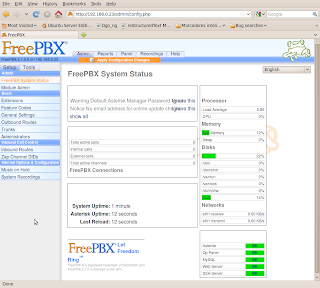
Instalación de Asterisk y FreePBX en una instancia vmware de Ubuntu 10.04 (Lucid) alpha3

english version - all spanish posts

Necesitaba probar unas configuraciones en una centralita y como no tengo ninguna a mano que mejor que probar de una vez por todas Asterisk y aprovechar para ver que tal va Ubuntu 10.04 a falta de poco mas de un mes para su lanzamiento.

Para la prueba creo una instancia de vmware-server 2.0 donde instalo Ubuntu 10.04 Lucid alpha3 con las actualizaciones hasta la fecha y con IP estática.

Para instalar Asterisk y su GUI FreePBX uso como base el script del wiki de ubuntu para Ubuntu 9.10; así que todos los reconocimientos deben de ir para los autores de dicho script.

Dicho lo anterior y tras un vistazo rápido al script, este no me gusta mucho; por ejemplo se hace un "chown asterisk:asterisk /var/run"!!!. Así que he preferido hacer un howto paso a paso usando el script como base por lo que os anoto aquí los pasos que he seguido yo.

Básicamente, los pasos de este howto, son los mismos que el script original. Hay muchos cambios en la forma y alguno en el fondo. Evito los pasos que no me convencen y me resigno a otros que o bien reorganizaría o bien escribiría de nuevo. A lo mejor si tuviera mas tiempo reescribiría el script, pero se trata de comprobar unas cosas en una IPPBX y nada mas. Al fín y al cabo al final todo funciona que es lo que importa.

Pasos:

Comenzamos con una instalación básica y actualizada de Lucid Alpha 3 server en vmware-server.

Instalar mysql (anotamos la password que proporcionamos para el user root de mysql: por ejemplo 1234):

aptitude update
aptitude install -y mysql-server

Instalar las otras dependencias que necesitaremos mas tarde:

aptitude install -y build-essential linux-headers-`uname -r` openssh-server bison flex apache2 php5 php5-curl php5-cli php5-mysql php-pear php-db php5-gd curl sox libncurses5-dev libssl-dev libmysqlclient15-dev mpg123 libxml2-dev

Descargar los elementos de asterisk que vamos a compilar:

cd /usr/src/
xargs wget << SOURCES
http://downloads.asterisk.org/pub/telephony/dahdi-linux-complete/releases/dahdi-linux-complete-2.2.1+2.2.1.tar.gz
http://downloads.asterisk.org/pub/telephony/libpri/releases/libpri-1.4.10.2.tar.gz
http://downloads.asterisk.org/pub/telephony/asterisk/releases/asterisk-1.6.2.6.tar.gz
http://downloads.asterisk.org/pub/telephony/asterisk/releases/asterisk-addons-1.6.2.0.tar.gz
SOURCES

Tras haber descargado los distintos componentes procedemos a su compilación. Siempre hay que leer la correspondiente documentación, al menos el README de turno.

Compilamos dahdi; no necesario seguramente para la instancia de vmware ya que se trata de los drivers para el kernel de hardware específico de telefonía:

tar xvf dahdi-linux-complete-2.2.1+2.2.1.tar.gz
cd dahdi-linux-complete-2.2.1+2.2.1
make all && make install && make config

Compilamos libpri:

cd ..
tar xvf libpri-1.4.10.2.tar.gz
cd libpri-1.4.10.2
make && make install

Ahora hacemos lo propio con asterisk:

cd ..
tar xvf asterisk-1.6.2.6.tar.gz
cd asterisk-1.6.2.6
./configure
make && make install

Sin olvidarnos de instalar las configuraciones de ejemplo:

make samples

Descomprimimos, compilamos e instalamos los addons para asterisk:

cd ..
tar xvf asterisk-addons-1.6.2.0.tar.gz
cd asterisk-addons-1.6.2.0
./configure
make && make install

Al igual que antes, nos propone instalar los archivos de ejemplo, cosa que hacemos así:

make samples

Finalmente instalamos los sonidos extra para nuestra centralita:

cd /var/lib/astersik/sounds
wget -O - http://downloads.asterisk.org/pub/telephony/sounds/asterisk-extra-sounds-en-gsm-current.tar.gz | tar xvfz -

Ahora pasamos a realizar las modificaciones oportunas para que funcione nuestra instalación. Creamos el usuario asterisk y añadimos al usuario de apache al grupo asterisk:

adduser asterisk --disabled-password --no-create-home --gecos "asterisk PBX user"
adduser www-data asterisk

Cambiamos el usuario y grupo por defecto de apache por el usuario y grupo asterisk en apache2.conf (a mi esto no me convence mucho, pero como se trata de una prueba rápida sigo las indicaciones del script original):

cp /etc/apache2/apache2.conf /etc/apache2/apache2.conf_orig
sed -i 's/^\(User\|Group\).*/\1 asterisk/' /etc/apache2/apache2.conf

También se propone en el script original que se modifique el ejecutable para el script /usr/sbin/safe_asterisk de sh a bash:

sed -i '1 {s/\<sh\>/bash/}' /usr/sbin/safe_asterisk

Creamos a continuación el script que se encargará de gestionar el servicio asterisk. Aquí no hago ningún cambio sobre el script original; únicamente añado la información básica para init que debería llevar todo script en /etc/init.d:

cat > /etc/init.d/asterisk <<-END_STARTUP
#!/bin/bash
### BEGIN INIT INFO
# Provides:          asterisk
# Required-Start:    \$network \$syslog
# Required-Stop:     \$network \$syslog
# Default-Start:     2 3 4 5
# Default-Stop:      0 1 6
# Short-Description: Asterisk daemon.
# Description:       This script handles start/stop states of asterisk.
### END INIT INFO

set -e
set -a
PATH=/usr/local/sbin:/usr/local/bin:/sbin:/bin:/usr/sbin:/usr/bin
DESC="Asterisk"
NAME=amportal
DAEMON=/usr/sbin/\$NAME

test -x \$DAEMON || exit 0

d_start() {
    amportal start
}

d_stop() {
    amportal stop
}

d_reload() {
    amportal restart
}

case "\$1" in

start)
    echo -n "Starting \$DESC: \$NAME"
    d_start
    echo "."
;;

stop)
    echo -n "Stopping \$DESC: \$NAME"
    d_stop
    echo "."
;;

restart|force-reload)
    echo -n "Restarting \$DESC: \$NAME"
    d_stop
    sleep 10
    d_start
    echo "."
;;

*)

    echo "Usage: \$SCRIPTNAME {start|stop|restart|force-reload}" >&2
    exit 3
;;

esac

exit 0
END_STARTUP

Realizamos las modificaciones oportunas para que arranque asterisk al inicar el sistema:

chmod 755 /etc/init.d/asterisk
update-rc.d asterisk defaults 90 10

Ya casi estamos, ahora instalamos FreePBX, la interfaz gráfica que vamos a instalar para manejar Asterisk (ahora viene el caos, esto reorganizado estaría mucho mejor):

cd /usr/src
wget -O - http://mirror.freepbx.org/freepbx-2.7.0.tar.gz | tar xvfz -
cd freepbx-2.7.0/

Copiamos el fichero de configruación amportal.conf a /etc/:

cp amportal.conf /etc/

Creamos las bases de datos; recordemos que habíamos usado "1234" como password para el usuario root de mysql. Necesitaremos definir también una contraseña para la base de datos de asterisk; por ejemplo 4321:

export MYSQL_ROOT_PW=1234
export ASTERISK_DB_PW=4321
mysqladmin -u root -p${MYSQL_ROOT_PW} create asterisk
mysqladmin -u root -p${MYSQL_ROOT_PW} create asteriskcdrdb
mysql -u root -p${MYSQL_ROOT_PW} asterisk < SQL/newinstall.sql
mysql -u root -p${MYSQL_ROOT_PW} asteriskcdrdb < SQL/cdr_mysql_table.sql
mysql -u root -p${MYSQL_ROOT_PW} <<-END_PRIVS
GRANT ALL PRIVILEGES ON asterisk.* TO asteriskuser@localhost IDENTIFIED BY "${ASTERISK_DB_PW}";
GRANT ALL PRIVILEGES ON asteriskcdrdb.* TO asteriskuser@localhost IDENTIFIED BY "${ASTERISK_DB_PW}";
flush privileges;
END_PRIVS

Y modificamos ligeramente la configuración de /etc/amportal.conf (en el script original se hace esto antes de instalar freepbx, así que nosotros también):

sed -i "s/# \(AMPDBUSER=.*\)/\1/" /etc/amportal.conf
sed -i "s/# \(AMPDBPASS=\).*/\1${ASTERISK_DB_PW}/" /etc/amportal.conf
sed -i "s@\(AMPWEBROOT=\).*@\1/var/www/@"  /etc/amportal.conf
sed -i "s@\(FOPWEBROOT=\).*@\1/var/www/panel@" /etc/amportal.conf
sed -i "s@\(FOPWEBADDRESS=\).*@PUTIPADDRESS@" /etc/amportal.conf

Ajustamos la configuración de PHP.ini en relación al uso de memoria de la siguente forma (en el script original hay cambios que no son necesarios para lucid):

sed -i 's/\(^upload_max_filesize = \).*/\120M/' /etc/php5/apache2/php.ini

Cambiamos los permisos de una serie de directorios:

chown asterisk. /var/run/asterisk
chown -R asterisk. /etc/asterisk
chown -R asterisk. /var/{lib,log,spool}/asterisk
chown -R asterisk. /var/www/

Habilitamos la configuración de asterisk tal y como se indica en /etc/asterisk/asterisk.conf:

sed -i '1 s/\(\[directories\]\).*/\1/' /etc/asterisk/asterisk.conf

Y ahora instalamos por fín freepbx:

./start_asterisk start
./install_amp

Reiniciamos apache2:

/etc/init.d/apache2 restart

Y dahdi si nos hiciera falta:

/etci/init.d/dadhi restart

Por último (parece ser necesario):

ln -s /var/lib/asterisk/moh /var/lib/asterisk/mohmp3
amportal start

Ya podemos conectarnos al interfaz de administración de nuestra nueva pbx virtual en http://ip/admin/

Comprobamos que al reniciar todo funciona!

Sunday, 17 January 2010

vmware-server-2.0.2 in ubuntu karmic

spanish version - all english posts

Update: I've written a post about the installation of vmware-server 2.0.x in Ubuntu 10.04 Lucid Lynx

Direct installation of VMware-server-2.0.2-203138.i386.tar.gz in Ubuntu 9.10 karmic exits with error when trying to compile the vmmon module:

[...]

None of the pre-built vmmon modules for VMware Server is suitable for your
running kernel.  Do you want this program to try to build the vmmon module for
your system (you need to have a C compiler installed on your system)? [yes]

Using compiler "/usr/bin/gcc". Use environment variable CC to override.

What is the location of the directory of C header files that match your running
kernel? [/lib/modules/2.6.31-17-generic/build/include]

Extracting the sources of the vmmon module.

Building the vmmon module.

Using 2.6.x kernel build system.
make: se ingresa al directorio `/tmp/vmware-config3/vmmon-only'
make -C /lib/modules/2.6.31-17-generic/build/include/.. SUBDIRS=$PWD SRCROOT=$PWD/. modules
make[1]: se ingresa al directorio `/usr/src/linux-headers-2.6.31-17-generic'
  CC [M]  /tmp/vmware-config3/vmmon-only/linux/driver.o
In file included from /tmp/vmware-config3/vmmon-only/linux/driver.c:31:
/tmp/vmware-config3/vmmon-only/./include/compat_wait.h:78: error: conflicting types for ‘poll_initwait’
include/linux/poll.h:70: note: previous declaration of ‘poll_initwait’ was here
In file included from /tmp/vmware-config3/vmmon-only/./include/vmware.h:38,
                 from /tmp/vmware-config3/vmmon-only/linux/driver.c:99:
/tmp/vmware-config3/vmmon-only/./include/vm_basic_types.h:108:7: warning: "__FreeBSD__" is not defined
In file included from /tmp/vmware-config3/vmmon-only/./include/vcpuset.h:103,
                 from /tmp/vmware-config3/vmmon-only/./include/modulecall.h:37,
                 from /tmp/vmware-config3/vmmon-only/./common/vmx86.h:33,
                 from /tmp/vmware-config3/vmmon-only/linux/driver.h:29,
                 from /tmp/vmware-config3/vmmon-only/linux/driver.c:101:
/tmp/vmware-config3/vmmon-only/./include/vm_atomic.h:329:7: warning: "_MSC_VER" is not defined
/tmp/vmware-config3/vmmon-only/./include/vm_atomic.h:333:7: warning: "_MSC_VER" is not defined
/tmp/vmware-config3/vmmon-only/./include/vm_atomic.h:401:7: warning: "_MSC_VER" is not defined
/tmp/vmware-config3/vmmon-only/./include/vm_atomic.h:407:7: warning: "_MSC_VER" is not defined
/tmp/vmware-config3/vmmon-only/./include/vm_atomic.h:506:7: warning: "_MSC_VER" is not defined
/tmp/vmware-config3/vmmon-only/./include/vm_atomic.h:595:7: warning: "_MSC_VER" is not defined
/tmp/vmware-config3/vmmon-only/./include/vm_atomic.h:684:7: warning: "_MSC_VER" is not defined
/tmp/vmware-config3/vmmon-only/./include/vm_atomic.h:773:7: warning: "_MSC_VER" is not defined
/tmp/vmware-config3/vmmon-only/./include/vm_atomic.h:775:7: warning: "_MSC_VER" is not defined
/tmp/vmware-config3/vmmon-only/./include/vm_atomic.h:860:7: warning: "_MSC_VER" is not defined
/tmp/vmware-config3/vmmon-only/./include/vm_atomic.h:862:7: warning: "_MSC_VER" is not defined
/tmp/vmware-config3/vmmon-only/./include/vm_atomic.h:945:7: warning: "_MSC_VER" is not defined
/tmp/vmware-config3/vmmon-only/./include/vm_atomic.h:947:7: warning: "_MSC_VER" is not defined
/tmp/vmware-config3/vmmon-only/./include/vm_atomic.h:1028:7: warning: "_MSC_VER" is not defined
/tmp/vmware-config3/vmmon-only/./include/vm_atomic.h:1030:7: warning: "_MSC_VER" is not defined
/tmp/vmware-config3/vmmon-only/./include/vm_atomic.h:1223:7: warning: "_MSC_VER" is not defined
/tmp/vmware-config3/vmmon-only/./include/vm_atomic.h:1227:7: warning: "_MSC_VER" is not defined
/tmp/vmware-config3/vmmon-only/./include/vm_atomic.h:1536:7: warning: "_MSC_VER" is not defined
/tmp/vmware-config3/vmmon-only/./include/vm_atomic.h:1663:7: warning: "_MSC_VER" is not defined
In file included from /tmp/vmware-config3/vmmon-only/./include/vm_basic_asm.h:46,
                 from /tmp/vmware-config3/vmmon-only/./include/rateconv.h:45,
                 from /tmp/vmware-config3/vmmon-only/./include/modulecall.h:40,
                 from /tmp/vmware-config3/vmmon-only/./common/vmx86.h:33,
                 from /tmp/vmware-config3/vmmon-only/linux/driver.h:29,
                 from /tmp/vmware-config3/vmmon-only/linux/driver.c:101:
/tmp/vmware-config3/vmmon-only/./include/vm_basic_asm_x86.h:62:7: warning: "_MSC_VER" is not defined
/tmp/vmware-config3/vmmon-only/./include/vm_basic_asm_x86.h:177:7: warning: "_MSC_VER" is not defined
/tmp/vmware-config3/vmmon-only/./include/vm_basic_asm_x86.h:346:7: warning: "_MSC_VER" is not defined
/tmp/vmware-config3/vmmon-only/./include/vm_basic_asm_x86.h:453:7: warning: "_MSC_VER" is not defined
In file included from /tmp/vmware-config3/vmmon-only/./include/vm_asm.h:43,
                 from /tmp/vmware-config3/vmmon-only/linux/driver.c:103:
/tmp/vmware-config3/vmmon-only/./include/vm_asm_x86.h:486:7: warning: "_MSC_VER" is not defined
/tmp/vmware-config3/vmmon-only/./include/vm_asm_x86.h:779:7: warning: "_MSC_VER" is not defined
/tmp/vmware-config3/vmmon-only/./include/vm_asm_x86.h:820:7: warning: "_MSC_VER" is not defined
/tmp/vmware-config3/vmmon-only/./include/vm_asm_x86.h:922:7: warning: "_MSC_VER" is not defined
In file included from /tmp/vmware-config3/vmmon-only/linux/driver.c:119:
/tmp/vmware-config3/vmmon-only/./common/hostif.h:53:7: warning: "WINNT_DDK" is not defined
/tmp/vmware-config3/vmmon-only/linux/driver.c: In function ‘LinuxDriverSyncCallOnEachCPU’:
/tmp/vmware-config3/vmmon-only/linux/driver.c:1423: error: too many arguments to function ‘smp_call_function’
/tmp/vmware-config3/vmmon-only/linux/driver.c: In function ‘LinuxDriver_Ioctl’:
/tmp/vmware-config3/vmmon-only/linux/driver.c:1987: error: ‘struct task_struct’ has no member named ‘euid’
/tmp/vmware-config3/vmmon-only/linux/driver.c:1987: error: ‘struct task_struct’ has no member named ‘uid’
/tmp/vmware-config3/vmmon-only/linux/driver.c:1988: error: ‘struct task_struct’ has no member named ‘fsuid’
/tmp/vmware-config3/vmmon-only/linux/driver.c:1988: error: ‘struct task_struct’ has no member named ‘uid’
/tmp/vmware-config3/vmmon-only/linux/driver.c:1989: error: ‘struct task_struct’ has no member named ‘egid’
/tmp/vmware-config3/vmmon-only/linux/driver.c:1989: error: ‘struct task_struct’ has no member named ‘gid’
/tmp/vmware-config3/vmmon-only/linux/driver.c:1990: error: ‘struct task_struct’ has no member named ‘fsgid’
/tmp/vmware-config3/vmmon-only/linux/driver.c:1990: error: ‘struct task_struct’ has no member named ‘gid’
/tmp/vmware-config3/vmmon-only/linux/driver.c:2007: error: too many arguments to function ‘smp_call_function’
make[2]: *** [/tmp/vmware-config3/vmmon-only/linux/driver.o] Error 1
make[1]: *** [_module_/tmp/vmware-config3/vmmon-only] Error 2
make[1]: se sale del directorio `/usr/src/linux-headers-2.6.31-17-generic'
make: *** [vmmon.ko] Error 2
make: se sale del directorio `/tmp/vmware-config3/vmmon-only'
For more information on how to troubleshoot module-related problems, please
visit our Web site at "http://www.vmware.com/go/unsup-linux-products" and
"http://www.vmware.com/go/unsup-linux-tools".

Execution aborted.

Unable to build the vmmon module.

To fix it we must download the ubuntugeek's patch for vmware-server 2.0.1 x64 modules. Yes, the patch for 64-bit fixes the 32-bit package:

root@blogger:/tmp# wget -O - http://www.ubuntugeek.com/images/vmware-server.2.0.1_x64-modules-2.6.30.4-fix.tgz | tar xvfz -

Once we have the patch file and the script that installs it we do:

root@blogger:/tmp# ./vmware-server.2.0.1_x64-modules-2.6.30.4-fix.sh
[...]
Replacing original file vmnet.tar with patched file
Replacing original file vsock.tar with patched file
Replacing original file vmmon.tar with patched file
Replacing original file vmci.tar with patched file
Done!

I have changed the files in here:
/usr/lib/vmware/modules/source

I have placed a backup of the original files in here:
/usr/lib/vmware/modules/source-backup

The original VMware modules directory is still in the way.
Please move this directory somewhere else, because it confuses VMware:
/usr/lib/vmware/modules/binary

This command should work now, to install the modules:
vmware-config.pl -d

Voila! re-run «vmware-config.pl -d» and enjoy that vmware finally works:

root@blogger:/tmp# vmware-config.pl -d
[...]
Starting VMware services:
   Virtual machine monitor                                             done
   Virtual machine communication interface                             done
   Virtual ethernet                                                    done
   Bridged networking on /dev/vmnet0                                   done
   Host-only networking on /dev/vmnet1 (background)                    done
   DHCP server on /dev/vmnet1                                          done
   Host-only networking on /dev/vmnet8 (background)                    done
   DHCP server on /dev/vmnet8                                          done
   NAT service on /dev/vmnet8                                          done
   VMware Server Authentication Daemon (background)                    done
   Shared Memory Available                                             done
Starting VMware management services:
   VMware Server Host Agent (background)                               done
   VMware Virtual Infrastructure Web Access
Starting VMware autostart virtual machines:
   Virtual machines                                                    done

The configuration of VMware Server 2.0.2 build-203138 for Linux for this
running kernel completed successfully.

vmware-server-2.0.2 en ubuntu karmic

english version - all spanish posts

Actualización: he redactado un post sobre la instalación de vmware-server 2.0.x en Ubuntu 10.04 Lucid Lynx

La instalación directa del targzip VMware-server-2.0.2-203138.i386.tar.gz en ubuntu 9.10 karmic acaba con un error al tratar de compilar el módulo vmmon:

[...]

None of the pre-built vmmon modules for VMware Server is suitable for your
running kernel.  Do you want this program to try to build the vmmon module for
your system (you need to have a C compiler installed on your system)? [yes]

Using compiler "/usr/bin/gcc". Use environment variable CC to override.

What is the location of the directory of C header files that match your running
kernel? [/lib/modules/2.6.31-17-generic/build/include]

Extracting the sources of the vmmon module.

Building the vmmon module.

Using 2.6.x kernel build system.
make: se ingresa al directorio `/tmp/vmware-config3/vmmon-only'
make -C /lib/modules/2.6.31-17-generic/build/include/.. SUBDIRS=$PWD SRCROOT=$PWD/. modules
make[1]: se ingresa al directorio `/usr/src/linux-headers-2.6.31-17-generic'
  CC [M]  /tmp/vmware-config3/vmmon-only/linux/driver.o
In file included from /tmp/vmware-config3/vmmon-only/linux/driver.c:31:
/tmp/vmware-config3/vmmon-only/./include/compat_wait.h:78: error: conflicting types for ‘poll_initwait’
include/linux/poll.h:70: note: previous declaration of ‘poll_initwait’ was here
In file included from /tmp/vmware-config3/vmmon-only/./include/vmware.h:38,
                 from /tmp/vmware-config3/vmmon-only/linux/driver.c:99:
/tmp/vmware-config3/vmmon-only/./include/vm_basic_types.h:108:7: warning: "__FreeBSD__" is not defined
In file included from /tmp/vmware-config3/vmmon-only/./include/vcpuset.h:103,
                 from /tmp/vmware-config3/vmmon-only/./include/modulecall.h:37,
                 from /tmp/vmware-config3/vmmon-only/./common/vmx86.h:33,
                 from /tmp/vmware-config3/vmmon-only/linux/driver.h:29,
                 from /tmp/vmware-config3/vmmon-only/linux/driver.c:101:
/tmp/vmware-config3/vmmon-only/./include/vm_atomic.h:329:7: warning: "_MSC_VER" is not defined
/tmp/vmware-config3/vmmon-only/./include/vm_atomic.h:333:7: warning: "_MSC_VER" is not defined
/tmp/vmware-config3/vmmon-only/./include/vm_atomic.h:401:7: warning: "_MSC_VER" is not defined
/tmp/vmware-config3/vmmon-only/./include/vm_atomic.h:407:7: warning: "_MSC_VER" is not defined
/tmp/vmware-config3/vmmon-only/./include/vm_atomic.h:506:7: warning: "_MSC_VER" is not defined
/tmp/vmware-config3/vmmon-only/./include/vm_atomic.h:595:7: warning: "_MSC_VER" is not defined
/tmp/vmware-config3/vmmon-only/./include/vm_atomic.h:684:7: warning: "_MSC_VER" is not defined
/tmp/vmware-config3/vmmon-only/./include/vm_atomic.h:773:7: warning: "_MSC_VER" is not defined
/tmp/vmware-config3/vmmon-only/./include/vm_atomic.h:775:7: warning: "_MSC_VER" is not defined
/tmp/vmware-config3/vmmon-only/./include/vm_atomic.h:860:7: warning: "_MSC_VER" is not defined
/tmp/vmware-config3/vmmon-only/./include/vm_atomic.h:862:7: warning: "_MSC_VER" is not defined
/tmp/vmware-config3/vmmon-only/./include/vm_atomic.h:945:7: warning: "_MSC_VER" is not defined
/tmp/vmware-config3/vmmon-only/./include/vm_atomic.h:947:7: warning: "_MSC_VER" is not defined
/tmp/vmware-config3/vmmon-only/./include/vm_atomic.h:1028:7: warning: "_MSC_VER" is not defined
/tmp/vmware-config3/vmmon-only/./include/vm_atomic.h:1030:7: warning: "_MSC_VER" is not defined
/tmp/vmware-config3/vmmon-only/./include/vm_atomic.h:1223:7: warning: "_MSC_VER" is not defined
/tmp/vmware-config3/vmmon-only/./include/vm_atomic.h:1227:7: warning: "_MSC_VER" is not defined
/tmp/vmware-config3/vmmon-only/./include/vm_atomic.h:1536:7: warning: "_MSC_VER" is not defined
/tmp/vmware-config3/vmmon-only/./include/vm_atomic.h:1663:7: warning: "_MSC_VER" is not defined
In file included from /tmp/vmware-config3/vmmon-only/./include/vm_basic_asm.h:46,
                 from /tmp/vmware-config3/vmmon-only/./include/rateconv.h:45,
                 from /tmp/vmware-config3/vmmon-only/./include/modulecall.h:40,
                 from /tmp/vmware-config3/vmmon-only/./common/vmx86.h:33,
                 from /tmp/vmware-config3/vmmon-only/linux/driver.h:29,
                 from /tmp/vmware-config3/vmmon-only/linux/driver.c:101:
/tmp/vmware-config3/vmmon-only/./include/vm_basic_asm_x86.h:62:7: warning: "_MSC_VER" is not defined
/tmp/vmware-config3/vmmon-only/./include/vm_basic_asm_x86.h:177:7: warning: "_MSC_VER" is not defined
/tmp/vmware-config3/vmmon-only/./include/vm_basic_asm_x86.h:346:7: warning: "_MSC_VER" is not defined
/tmp/vmware-config3/vmmon-only/./include/vm_basic_asm_x86.h:453:7: warning: "_MSC_VER" is not defined
In file included from /tmp/vmware-config3/vmmon-only/./include/vm_asm.h:43,
                 from /tmp/vmware-config3/vmmon-only/linux/driver.c:103:
/tmp/vmware-config3/vmmon-only/./include/vm_asm_x86.h:486:7: warning: "_MSC_VER" is not defined
/tmp/vmware-config3/vmmon-only/./include/vm_asm_x86.h:779:7: warning: "_MSC_VER" is not defined
/tmp/vmware-config3/vmmon-only/./include/vm_asm_x86.h:820:7: warning: "_MSC_VER" is not defined
/tmp/vmware-config3/vmmon-only/./include/vm_asm_x86.h:922:7: warning: "_MSC_VER" is not defined
In file included from /tmp/vmware-config3/vmmon-only/linux/driver.c:119:
/tmp/vmware-config3/vmmon-only/./common/hostif.h:53:7: warning: "WINNT_DDK" is not defined
/tmp/vmware-config3/vmmon-only/linux/driver.c: In function ‘LinuxDriverSyncCallOnEachCPU’:
/tmp/vmware-config3/vmmon-only/linux/driver.c:1423: error: too many arguments to function ‘smp_call_function’
/tmp/vmware-config3/vmmon-only/linux/driver.c: In function ‘LinuxDriver_Ioctl’:
/tmp/vmware-config3/vmmon-only/linux/driver.c:1987: error: ‘struct task_struct’ has no member named ‘euid’
/tmp/vmware-config3/vmmon-only/linux/driver.c:1987: error: ‘struct task_struct’ has no member named ‘uid’
/tmp/vmware-config3/vmmon-only/linux/driver.c:1988: error: ‘struct task_struct’ has no member named ‘fsuid’
/tmp/vmware-config3/vmmon-only/linux/driver.c:1988: error: ‘struct task_struct’ has no member named ‘uid’
/tmp/vmware-config3/vmmon-only/linux/driver.c:1989: error: ‘struct task_struct’ has no member named ‘egid’
/tmp/vmware-config3/vmmon-only/linux/driver.c:1989: error: ‘struct task_struct’ has no member named ‘gid’
/tmp/vmware-config3/vmmon-only/linux/driver.c:1990: error: ‘struct task_struct’ has no member named ‘fsgid’
/tmp/vmware-config3/vmmon-only/linux/driver.c:1990: error: ‘struct task_struct’ has no member named ‘gid’
/tmp/vmware-config3/vmmon-only/linux/driver.c:2007: error: too many arguments to function ‘smp_call_function’
make[2]: *** [/tmp/vmware-config3/vmmon-only/linux/driver.o] Error 1
make[1]: *** [_module_/tmp/vmware-config3/vmmon-only] Error 2
make[1]: se sale del directorio `/usr/src/linux-headers-2.6.31-17-generic'
make: *** [vmmon.ko] Error 2
make: se sale del directorio `/tmp/vmware-config3/vmmon-only'
For more information on how to troubleshoot module-related problems, please
visit our Web site at "http://www.vmware.com/go/unsup-linux-products" and
"http://www.vmware.com/go/unsup-linux-tools".

Execution aborted.

Unable to build the vmmon module.

Para solucionarlo debemos descargar de ubuntugeek el parche para los módulos de vmware-server 2.0.1 x64. Si; el parche para los módulos de 64bits

root@blogger:/tmp# wget -O - http://www.ubuntugeek.com/images/vmware-server.2.0.1_x64-modules-2.6.30.4-fix.tgz | tar xvfz -

Una vez ya tenemos el fichero patch y el script que lo instala ejecutamos:

root@blogger:/tmp# ./vmware-server.2.0.1_x64-modules-2.6.30.4-fix.sh
[...]
Replacing original file vmnet.tar with patched file
Replacing original file vsock.tar with patched file
Replacing original file vmmon.tar with patched file
Replacing original file vmci.tar with patched file
Done!

I have changed the files in here:
/usr/lib/vmware/modules/source

I have placed a backup of the original files in here:
/usr/lib/vmware/modules/source-backup

The original VMware modules directory is still in the way.
Please move this directory somewhere else, because it confuses VMware:
/usr/lib/vmware/modules/binary

This command should work now, to install the modules:
vmware-config.pl -d

Voila! volvemos a ejecutar vmware-config.pl -d y comprobamos que por fín funciona vmware:

root@blogger:/tmp# vmware-config.pl -d
[...]
Starting VMware services:
   Virtual machine monitor                                             done
   Virtual machine communication interface                             done
   Virtual ethernet                                                    done
   Bridged networking on /dev/vmnet0                                   done
   Host-only networking on /dev/vmnet1 (background)                    done
   DHCP server on /dev/vmnet1                                          done
   Host-only networking on /dev/vmnet8 (background)                    done
   DHCP server on /dev/vmnet8                                          done
   NAT service on /dev/vmnet8                                          done
   VMware Server Authentication Daemon (background)                    done
   Shared Memory Available                                             done
Starting VMware management services:
   VMware Server Host Agent (background)                               done
   VMware Virtual Infrastructure Web Access
Starting VMware autostart virtual machines:
   Virtual machines                                                    done

The configuration of VMware Server 2.0.2 build-203138 for Linux for this
running kernel completed successfully.